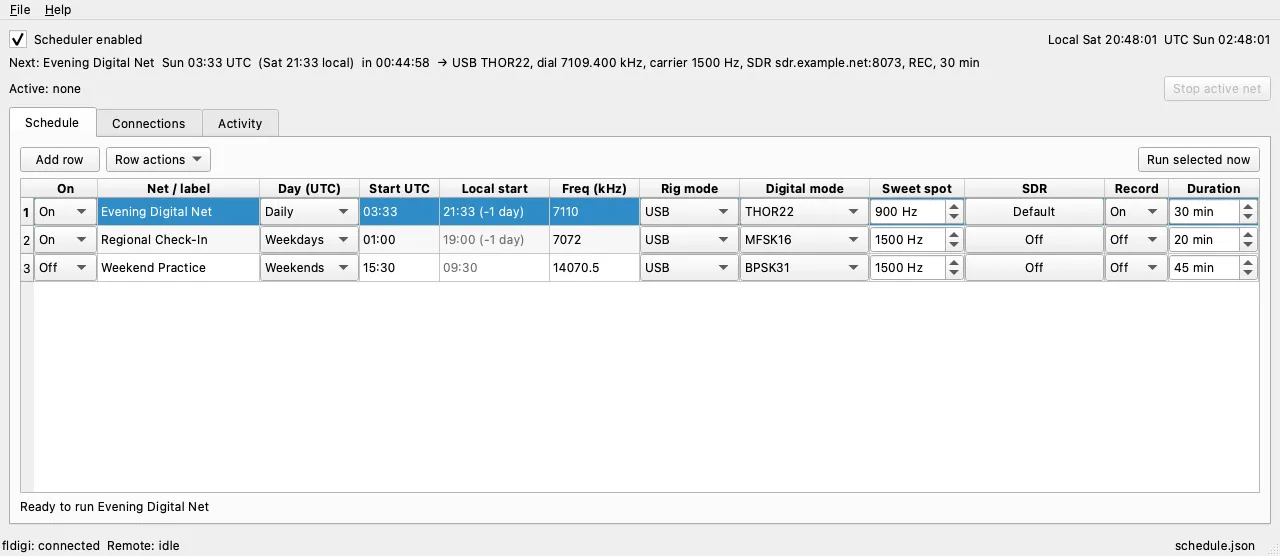
Digital nets happen at specific UTC times on specific frequencies, with specific modems. FLDigi Net Scheduler keeps a weekly schedule of nets in a grid and, at each start time, sets fldigi’s rig mode, dial frequency, modem and audio carrier for you. It can also connect a KiwiSDR and record the net, then shut everything down when the duration ends.
The app never transmits. It only changes receive-side settings. Keying the radio is always up to you.
Features
- Schedule grid with on/off, label, day, start time in UTC with a local-time column, frequency, rig mode, digital mode, sweet spot, SDR, Record and Duration.
- Live status of fldigi’s dial, rig mode, modem and carrier, plus local and UTC clocks and a countdown to the next net.
- Mode lists loaded from fldigi itself (
rig.get_modes,modem.get_names), shown as dropdowns. - Sweet-spot handling: each net’s dial is shifted so the signal lands where fldigi expects it.
- KiwiSDR connect and recording for each net through the KiwiSDR Remote or Icom Remote API, with named WAV files like
Texas-Digital-Net_20261027T010000Z.wav. - Durations: recording stops and the SDR disconnects when time is up. A net still running when the next one starts is ended first.
- Run selected now and Stop active net buttons, and an Activity log.
- Autosaving JSON schedule, plus a CSV export/import tool so nets can be edited in Excel.
- Test without a radio using the included mock fldigi and mock Remote API servers.
How a net is applied
At the start time the app ends any previous net, connects the SDR if needed, tunes the Remote client, then sets fldigi’s rig mode, dial frequency, modem and carrier, and finally starts recording. It confirms the modem switch and logs each step.
Works with
- fldigi 4.2.13 or similar, using its XML-RPC interface.
- KiwiSDR Remote Client or Icom Remote Client Next for SDR connect and recording. Run only one at a time.
Ready to try it?
The install guide covers requirements, downloads, building from source, and first-run setup.